Discover, Compare & Master Find the best AI tools for your next project in seconds. Check our latest AI insights

Videocandy

Verified Featured

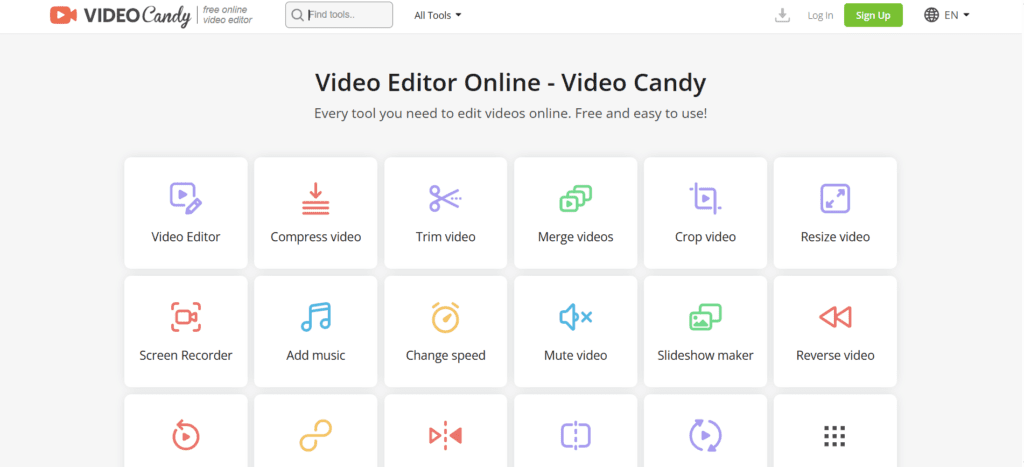
VideoCandy AI is a browser-based video editing platform that is ideal for beginners and professionals to edit, enhance, and convert videos.

4.2/5 editorial rating 250 upvotes
  • Main category: video
  • Subcategory: Video Editor
  • Pricing: Free
  • Web
  • Best For Beginner content creators and small businesses for quick video editing.
  • Free Trial Not Available
  • Reviewed By arbaazkhan
  • Last Updated January 6, 2026

Editorial note: ratings and verdicts on this page are internal editorial assessments, not third-party user review averages.

Videocandy Verdict

VideoCandy is an AI-powered tool that has the ability to simplify video creation and editing. The tool automates the complex tasks, which makes it easy for beginners to use. After testing, the experts found the AI different from traditional editing. It has the advanced features of automatic scene detection, innovative editing tools, and visual enhancements. Users can test the editing features at the start without paying.

What Is Videocandy?

VideoCandy AI is a browser-based video editing platform that is ideal for beginners and professionals to edit, enhance, and convert videos. The technology is built on the AI-assisted features to perform tasks like formatting and basic adjustments.
It lets users trim, merge, compress, screen recording, and perform format conversion freely with an easy interface. VideoCandy AI is ideal for content creators, small businesses, educators, and marketers to get reliable video editing for social media and everyday projects.

Review Summary

  • Performance Score B+
  • Content Quality Content Quality Creates reliable outputs for social media formats and other platforms.
  • Interface Straightforward, drag-and-drop style.
  • Ai Technology AI-based enhancements for better video quality.
  • Purpose Make video editing accessible for small creators.

  • Compatibility Works on major browse.
  • Pricing Summary Freemium + paid plans available.

Videocandy Key Features

  • 1

    70+ Editing Tools (trim, cut, split, merge, crop, resize, blur, adjust speed and others)

  • 2

    Format Conversion

  • 3

    AI-Enhanced Processing

  • 4

    Add Audio & Captions

  • 5

    Screen Recorder

  • 6

    Slideshow Maker

  • 7

    Watermark Free on Premium Plans

  • 8

    Real-Time Preview Mode

  • 9

    Visual Enhancements and Filters

Who Should Use Videocandy?

VideoCandy AI is a browser-based video editing platform that is ideal for beginners and professionals to edit, enhance, and convert videos.

Is Videocandy Worth It?

Videocandy is a free tool, so the main question is whether its output quality and workflow match your needs.

Pros And Cons

Pros

  • Completely web-based, no software installation required.
  • Drag & drop easy-to-use interface.
  • Multiple sets of tools are available to create a professional video.
  • No watermark is included in paid plans.
  • Lifetime pricing makes it affordable to use the tool.

Cons

  • Needs a stable connection to work smoothly.
  • Long video uploads are restricted.
  • Freemium offers basic features, access and limited usage.
  • No support for advanced video effects and animations.
  • High-resolution export is available in paid plans.

Videocandy Pricing

Monthly Plan

$8/month

  • No watermark applied
  • Video editor + 70 tools
  • Unlimited downloads
  • Upload files up to 8 GB
  • High-priority processing
  • 20 min processing time limit

Frequently Asked Questions